Pull your sessions straight from your AiM or RaceBox, or import a file. Replay every lap, race your ghost and see exactly where you leave time on the table. At the track, everything works offline.
ConnectJoin your lap timer’s WiFi, or pair a RaceBox over Bluetooth. That’s the whole setup.
2
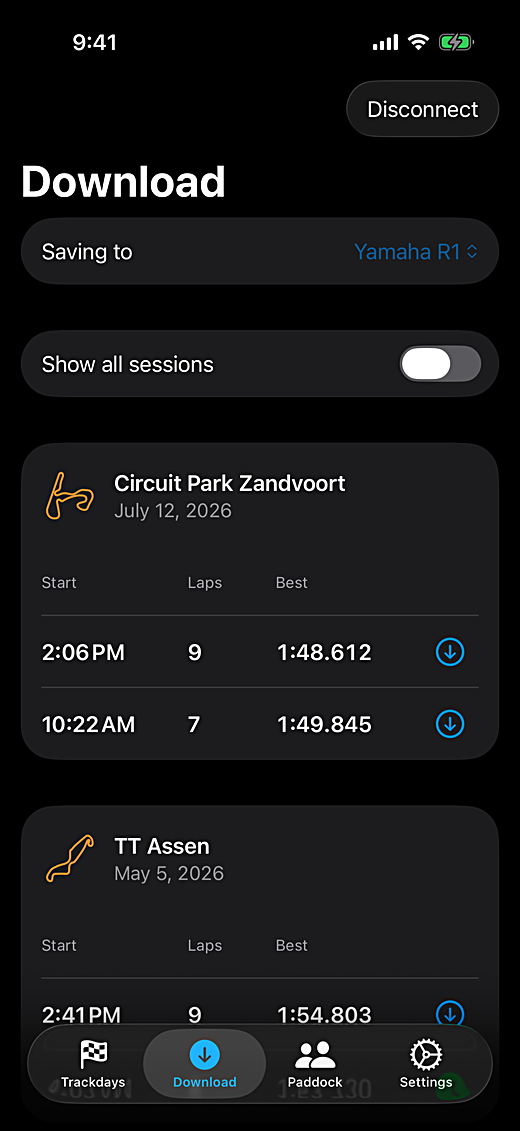
DownloadGrab your sessions right at the track. No computer, no export, no signal needed.
3
ReplayYour laps and insights are on your phone seconds later.
Straight from your lap timer
No computer, no export.
Via WiFi · AiMJoin the WiFi of your Solo 2, Solo 2 DL, MXL2, MXS or EVO5, pick a session, done.
Via Bluetooth · RaceBoxLay your Mini S or Micro next to your phone and tap Search. Sessions appear while the transfer runs, and a second download only brings what is new.
File import · ten brands
No direct connection? Import the file.
1
Export the session in your timer’s app.
RaceChrono.vbo
Dragy.vbo
StarlaneFull Session .csv from MAAT
Racelogic.vbo
Lap Legend.vbo or .csv
I2M.dat from the USB key
PZ Racing.ses
Yamaha.ctrk from the Y-TRAC app
RaceBox.vbo or .csv
AiM.xrz, .xrk or Race Studio 2 .csv
2
Open the file in Pushlapp, from Files, AirDrop or the Import button.
3
Done. Laps, sectors, replay, ghost and leaderboard, like any other session.
Direct connection for Starlane and Dragy is in development.
Replay any lap, on any track
Watch your line on the track map, with your speed and g-forces as you go. On a bike? Your lean angle is in there too. On a Solo 2 DL, MXL2, MXS 1.3 or EVO5? Throttle position and RPM come along. In a car or kart with a Racelogic box? Brake pressure, RPM and gear come along too. Brake and throttle points are marked right on the timeline, so you can check what actually happened in turn 3, not what you think happened.
thousands of built-in tracks worldwide
Race your ghost
Pick a lap and race it against your personal best. A ghost rides the map with you, and the live delta shows exactly where you gain and lose, corner by corner. Want a bigger target? Chase your theoretical best, stitched from sectors you actually rode, or line up against any lap at that track, yours or one a friend sent you. That’s how the next second comes off.
best lap 1:53.720 · theoretical best 1:53.445
Meet you in the Paddock
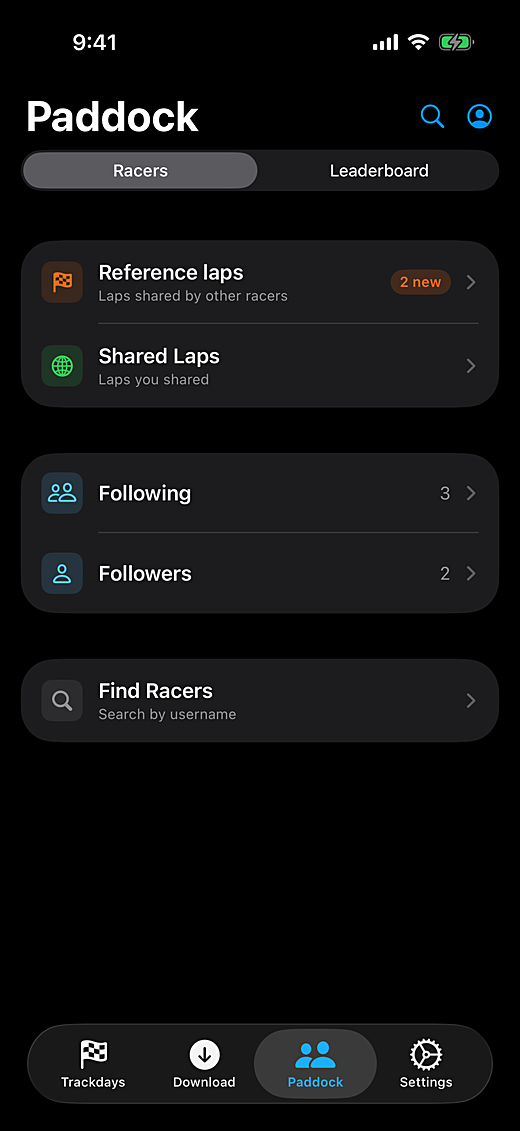
Follow your friends, browse the laps they made public and compare your lap times with theirs. Send your best lap privately to one racer, and stop sharing whenever you want. Everything you receive waits in your Reference laps library, grouped by track and ready to race. Set a time you’re proud of? Drop the lap poster straight into the group chat.
private by default, you choose per lap
See who is fastest at your track
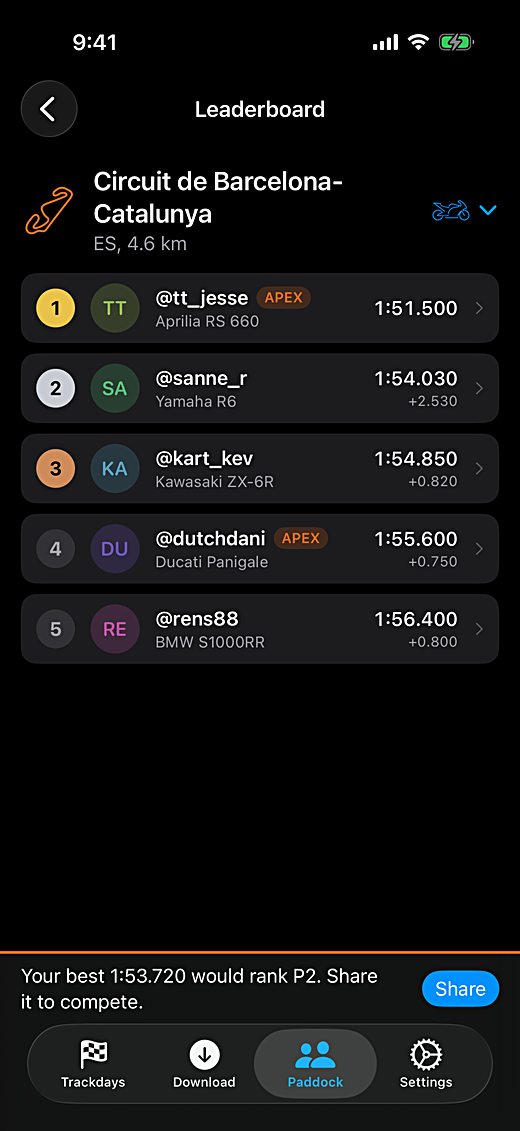
Every track day ends with the same question in the paddock. Now there’s an answer: one leaderboard per track, ranked by each racer’s best public lap, with its own class for bikes, cars and karts. Pushlapp tells you exactly where your best lap would rank. Share it and you’re on the board. Your laps stay private by default, so only the laps you choose count.
your best 1:53.720 would rank P2
Apex
The core makes lap analysis effortless. Apex makes you faster.
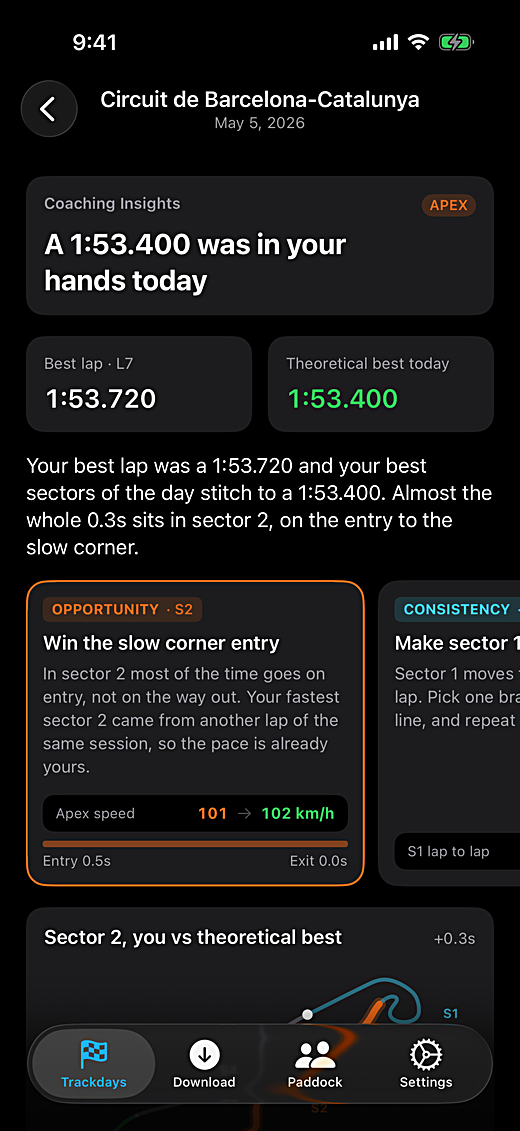
After every track day, Coaching Insights reads your laps the way a coach would. Where the time went, corner by corner. Whether the entry or the exit is costing you, and one concrete place to find real time next session. Every number is computed from your own laps and told in plain language. The day’s headline is there for every racer; the full breakdown is Apex.
Your theoretical best, stitched from the fastest sectors you actually rode. A chase target that is really in you.
Compare or ghost against any lap. Your own, a friend’s, or a row on the leaderboard.
Import reference laps from lap files, even raw session files. The fastest lap is picked out for you.
Every session file backed up automatically, private to your account. A new phone never costs you your laps.
what would a coach see in your laps?
The rest is taken care of
Your whole season, organizedSessions filed by vehicle, track and track day, with a note under each.
One garage for bikes, cars and kartsEvery session lands with the right vehicle.
Private by defaultYou choose per lap what goes public. Everything else stays yours.
Offline at the trackDownload and analyze with zero bars. Sign in once.
Supported devices
Works with your lap timer
Pull sessions straight from your timer, or bring a file in. These are the devices Pushlapp works with today.
AiM Solo 2SupportedWiFi
AiM Solo 2 DLSupportedWiFi
AiM MXL2SupportedWiFi
AiM MXS 1.3SupportedWiFi
AiM EVO5SupportedWiFi
RaceBox Mini SSupportedBluetooth
RaceBox MicroSupportedBluetooth
RaceBox MiniFile importExport a session in the RaceBox app, then import the file into Pushlapp.
RaceChrono ProFile importExport the session as VBO (Racelogic) in RaceChrono, then import it.
DragyFile importExport the session as VBO from the Dragy Lap app, then import it.Direct connection in development
Racelogic VBOXFile importImport the .vbo the box records. Brake pressure, RPM and gear come along.
Lap LegendFile importExport the session as VBO or CSV in Lap Legend, then import it.
I2M DashboardsFile importCopy the .dat log from the dash’s USB key, then import it. A day file becomes one session per run.
PZ RacingFile importImport the .ses file from the logger. A file with two sessions becomes two sessions.
YamahaFile importImport the .ctrk file the Y-TRAC app shares from your YZF-R1 or R1M. Laps are timed on the record line stored in Y-TRAC, with the bike’s throttle and revs in the replay.
AiM Solo (first generation)File importExport the Race Studio 2 CSV, then import it into Pushlapp.
Starlane Stealth GPS-4File importExport the Full Session CSV in MAAT, then import it into Pushlapp.Direct connection in development
Starlane Stealth GPS-5File importExport the Full Session CSV in MAAT, then import it into Pushlapp.Direct connection in development
 One app for every lap timer